
Technical SEO has a reputation for being a bottomless list. It isn't, most sites have the same handful of problems, and about 80% of the available gain sits in the first three passes below.
The reason for the ordering: there's no point optimising a page's content if search engines can't crawl it, and no point building internal links to a page that shouldn't be indexed.
Pass 1, Crawlability
Can search engines reach your pages at all?
- robots.txt, check it isn't blocking anything important. I've seen staging rules survive a launch and block an entire site for months.
- XML sitemap, present, submitted in Search Console, and containing only canonical, indexable URLs. A sitemap full of redirects and 404s wastes crawl budget and signals carelessness.
- Crawl the site and look at response codes. Fix 404s on pages that have internal links or backlinks pointing at them. Reduce redirect chains to a single hop.
- Check crawl depth. Anything more than three clicks from the homepage is being told, by your own architecture, that it doesn't matter.
Pass 2, Indexation
Of the pages that can be crawled, which are actually in the index, and should they be?
- Search Console, †’ Pages report. Work through the excluded reasons. "Discovered, currently not indexed" at scale usually means quality or internal linking problems, not a technical fault.
- Look for index bloat. Tag archives, filtered URLs, paginated duplicates, search result pages. These dilute the site's perceived quality. Noindex them.
- Canonical tags, every page should have one, pointing at itself unless there's a deliberate reason otherwise.
- Check for duplicate content across www/non-www, http/https, and trailing-slash variants. Pick one and redirect the rest.
Pass 3, Internal linking and site structure
This is where the largest gains usually hide, and it's the one most audits treat as an afterthought.
- Identify your priority pages, the ones that make money. Then count how many internal links point at each. On most sites the answer for the most important page is embarrassingly low.
- Route authority deliberately. Add contextual links from your highest-authority pages to your priority pages. Not a footer link block, links inside relevant body content.
- Fix orphan pages. Any page with zero internal links is invisible to both crawlers and users.
- Use descriptive anchor text. "Local SEO services" tells search engines something; "click here" tells them nothing.
- Map your topic hierarchy. Group related content so the relationships between topics are explicit. This is what lets a site be understood as expert in something rather than as a collection of unrelated pages.
Pass 4, Keyword cannibalisation
Export your queries from Search Console and group by query. Where several of your pages rank for the same term, you have a problem: search engines are being forced to choose between your own pages, and typically all of them rank worse than one good page would.
Three fixes, in order of preference:
- Consolidate, merge the pages into one stronger page and 301 the rest.
- Differentiate, rewrite each page to target a genuinely distinct search intent.
- Deprecate, if a page has no unique purpose, remove it and redirect.
Pass 5, On-page fundamentals
Only now is it worth going page by page. For every priority page:
- One H1 per page, describing the page's actual subject
- Logical H2/H3 hierarchy, headings as structure, not styling
- Title tag, unique, descriptive, front-loaded with what matters
- Meta description, written to earn the click, not to hold keywords
- Descriptive URL slug, short and readable
- Image alt text that describes the image for someone who can't see it
- Schema markup, LocalBusiness, Article, Product or FAQ as appropriate
- Internal and external links placed in context
On WordPress, RankMath or Yoast handles most of the plumbing. On Shopify it's theme-level work. Either way the thinking is identical, the plugin doesn't decide what the page is about.
Pass 6, Core Web Vitals and mobile
Performance is a ranking factor, but more importantly it's a conversion factor. Check the Core Web Vitals report in Search Console, using field data rather than lab scores.
- Compress and correctly size images, the single biggest win on most sites. Serve them at display dimensions, not full resolution scaled down in CSS.
- Set explicit width and height on images to prevent layout shift.
- Lazy-load below-the-fold images, never the hero image.
- Audit your plugins and scripts. Every tracking script costs load time; be honest about which ones anyone actually reads.
- Test on a real phone on mobile data, not a desktop browser at a narrow width. They are not the same experience.
Then: monitor, don't re-audit
Set a monthly rhythm in Search Console, the Pages report for new indexation problems, the Performance report for queries gaining or losing ground, and Core Web Vitals for regressions after site changes.
Technical SEO isn't a project you complete. It's a maintenance state you hold.
When technical SEO, internal linking and content organisation work together, sites become easier to crawl, easier to understand and easier to rank.
What this is worth
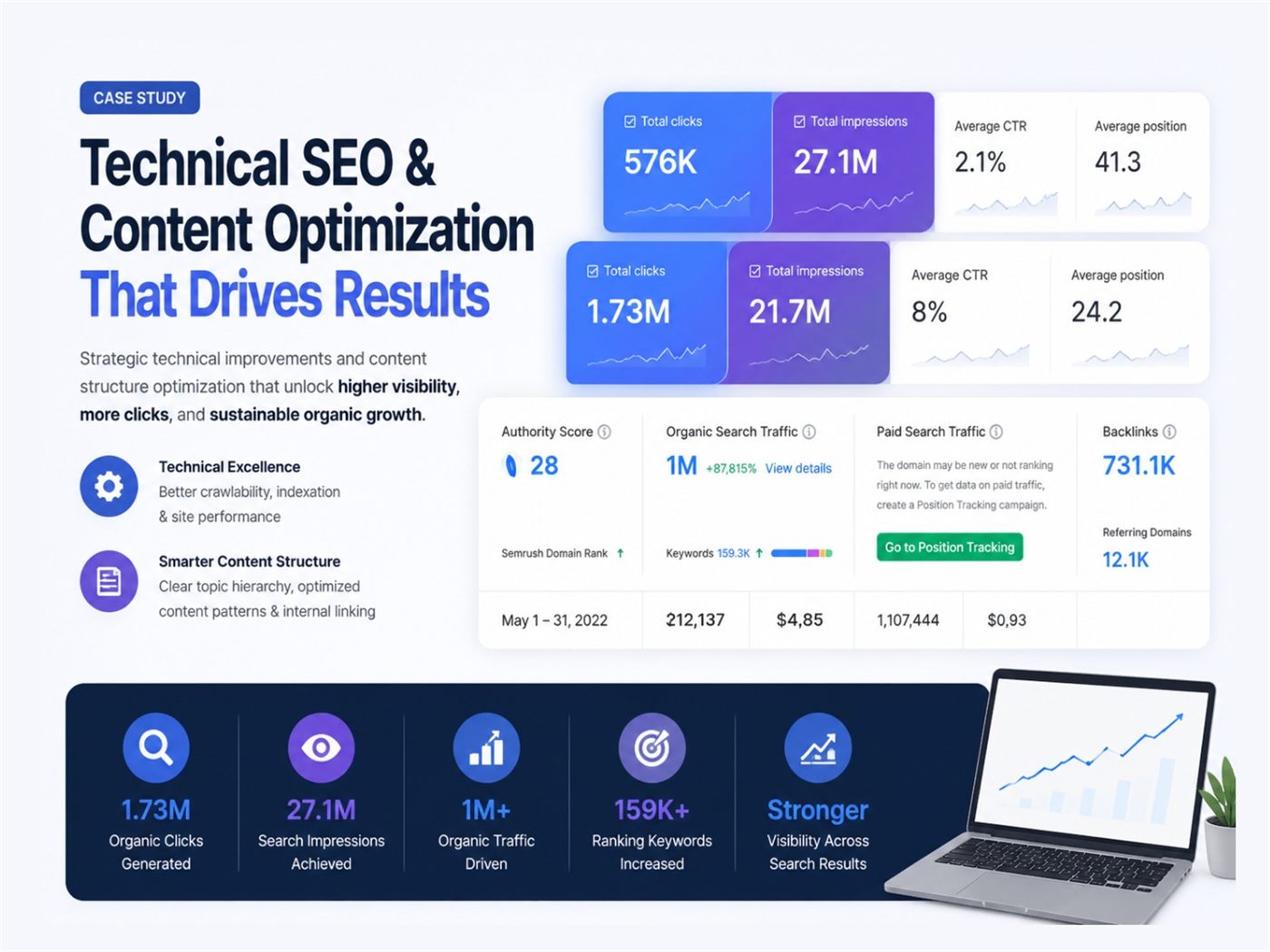
On one project, running this sequence properly, with no new content published, produced 1.73M organic clicks and 27.1M impressions against 159K+ ranking keywords. The content was already there. It just couldn't be found, prioritised, or understood.